
One click email/SMS sending from Siebel form applets
Siebel offers for sending emails / sms / faxes using “F9” functionality. One can define User Properties “Recipient Email Address Field”, “Recipient Fax Address Field” to define the email Address or fax number of the recipient. Further, user properties “Recipient Id Field X” are defined to specify the entity and record which is used as a possible recipient. If user within Siebel presses F9, the “Comm Recipient Group Pick List Applet” is open to manually select the recipient.
Customer objective was, to implement one-click functionality for sending emails and SMS directly from contact applet. We have added custom buttons directly on contact applet, see following picture.
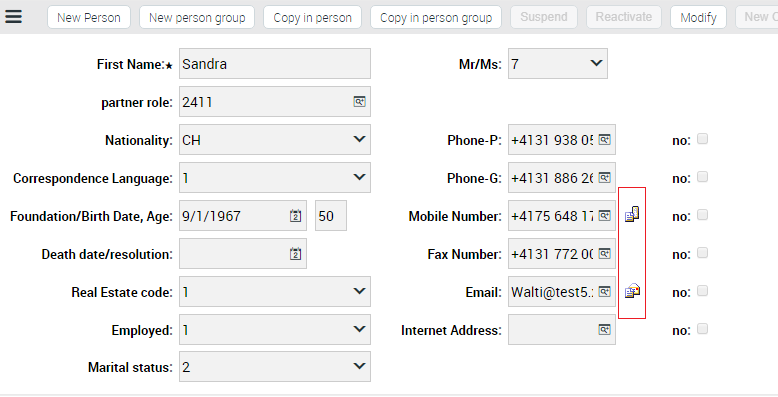
The button for email sending calls the browser script with following code:
theApplication().SetProfileAttr(“SendMailBusComp”, “Contact”);
theApplication().ActiveApplet.InvokeMethod(“FileSendMail”);
When there are more user properties of type “Recipient Id Field X”, Siebel opens Recipient Pick Applet where user has to select recipient. In this case, the recipient is clear, it is contact itself, so the selecting of the recipient in “Comm Recipient Group Pick List Applet” is obsolete delay. The originally requirement was to directly show the Email Popup Applet. To fulfill this requirement, we have added following browser script to the “Comm Recipient Group Pick List Applet”
function Applet_Load()
{
if (theApplication().GetProfileAttr(“SendMailBusComp”)==“Contact”)
setTimeout(“MyOnLoad(), 1000);
}
Browser script in method Load, sets the timeout function for picking the record in the applet. The “PickRecord” cannot be called in the Applet_Load function, because the processing of the applet loading must be accomplished. After executing browser script method, Siebel continues with server script, where we select the next record among recipients in the case F9 has been pushed on Contact applet.
function Applet_Load()
{
if (theApplication().GetProfileAttr(“SendMailBusComp”)==“Contact”) {
this.BusComp().NextRecord();
theApplication().SetProfileAttr(“SendMailBusComp”, “”);
}
}
After execution of this method Siebel “accomplishes” the loading of the applet. Finally our browser script method MyOnLoad is called to pick the record and close the “Comm Recipient Group Pick List Applet” and opens Email popup applet: “Send Communication Applet”
function MyOnLoad()
{
theApplication().ActiveApplet().InvokeMethod(“PickRecord”);
}





