
Calling shell script from Business Service to process extracted siebel attachments
In this blog we will share and demonstrate the possibility call linux shell script from the siebel business service orchestrated in the workflow.
We will demonstrate the possibility to call linux shell script from the business service on the scenario, where we migrate siebel attachments from siebel filesystem into external document management system. We have implemented functionality which is extracting siebel entity attachments, in this case contract attachments from siebel filesystem into linux filesystem, creates sha256 sum for check and extracts business keys and data into xml.
Some parts as creating sha256 sum , copying the extracted file from../siebel/sieb/siebsrvr/temp/ to defined directory, create subfolders to avoid having too many files in one folder. The shell script is creating for each attahment a separate folder where the attachments is copied together with the sha256sum file and with the xml containing business keys.
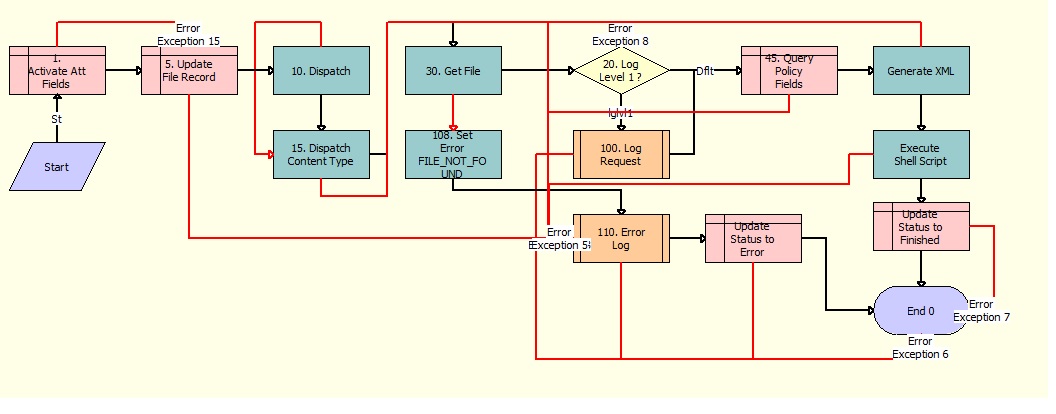
The orchestration workflow performs following :
- Query the attachment data
- updates the attachment record
- query the data needed for processing such as destination path, temp path etc
- Get the file from siebel filesystem into linux filesystem
- Get the contract business keys
- generate XML
- execute the shellscript
For the purpose of this blog it is interesting to describe the step 4 and 7.
The step 4 uses BC method Get File. This method extracts the attachment file from siebel filesystem into linux filesystem. It is by default extracted into siebel server temp directory. Here is the important part of the script doing so :
sAttachmentExt = oBC.GetFieldValue(sExtFieldName);
sFilePath = oBC.InvokeMethod("GetFile", sFileFieldName);
nIndex = sFilePath.indexOf(",");
sResult = sFilePath.substring(0, nIndex);
if (sResult != "Success") {
	sErrorMessage = "File not copied to tmp folder!";
}
The oBC has a cursor on the attachment BC record, which file should be extracted.
Now comes the main part, how to call a shell script from the e-script. The job is done by returnValue = Clib.system(sScriptPath + sScriptName);
function ExecuteShellScript(Inputs:PropertySet, Outputs:PropertySet)
{
	var returnValue = null;
	var sScriptPath = null;
	var sScriptName = null;
	try {
		//get input properties
		sScriptPath	= Inputs.GetProperty("ScriptPath");
		sScriptName = Inputs.GetProperty("ScriptName");
		//execute script
		if(sScriptName != null && sScriptName != "")
			returnValue = Clib.system(sScriptPath + sScriptName);
	}
	catch (e) {
		TheApplication().Write_To_Log( this.Name(), "ExecuteShellScript", "Input/Output properties:nScriptPath: " + sScriptPath + ",nScriptName: " + sScriptName + ",nReturnValue: " + returnValue + "nnError: " + e.toString(), "Error", "");
		throw e;
	}
	finally {
		Outputs.SetProperty("ReturnValue", returnValue);
		sScriptName = null;
		sScriptPath = null;
		returnValue = null;
	}
}
The last part is executed by shell script , which is called from orchestrated workflow within the step containing e-script. The shellscript creates the neccessary directories and copies all the files into defined folder for streams to migrate them into DMS:
#!/bin/ksh
# ========================================================================
# Filename:  process_exported_attachments.sh
# $Date$
# $Revision$
# $Author$
#
# Usage:      ./process_exported_attachments.sh fs_filename filename ext XMLFile
#
# Purpose:    copy the extracted attachment file into temp directory, generate sha256
#
# Version 01: Martin Piekov
#
#
# ========================================================================
export RELEASE_HOME="/data/siebel/CRM_RELEASES"
export LOGNAME="sieblsys"
. "${RELEASE_HOME}/maintenance/${LOGNAME}/bin/${LOGNAME}.sh"
#------------------------------------------------------------------------------
# Very global initialization
(( RETURN_CODE = 0 ))
export LOG_SCRIPT="$0"

export INTERFACE_NAME="177_export_attachments_utilities"
export INTERFACE_DIR="98_field_migration/177_export_attachments_utilities"
export MIGR_DIR="${RELEASE_HOME}/maintenance/$LOGNAME/migration/migration"
export WRK_DIR="$MIGR_DIR/$INTERFACE_DIR"
export filename="$2.$3"

EXPORT_PATH="${WRK_DIR}"
LOG_DIR="${WRK_DIR}/log"
datedir=`date '+%d%m%Y'`
guid=`uuidgen`
ATT_DIR="${EXPORT_PATH}/${2}${datedir}${guid}"

mkdir -p "${LOG_DIR}"
#create temp directory
mkdir -p "${ATT_DIR}"
IF_TIMESTAMP=`date '+%Y%m%d%H%M%S'`
DEFAULTLOGNAME="${INTERFACE_NAME}.${IF_TIMESTAMP}"
LOGFILE_OUTPUT="${LOG_DIR}/${DEFAULTLOGNAME}.log"
#------------------------------------------------------------------------------------------------------------------------------------
# Initialize logging
 . "${RELEASE_HOME}/maintenance/${LOGNAME}/bin/logging.sh" "${LOG_DIR}/${DEFAULTLOGNAME}.log" "${LOG_DIR}/${DEFAULTLOGNAME}_output.log"
# -----------------------------------------------------------------------------------------------------------------------------------------
log "======================================================================================" nots        | tee -a "${LOGFILE_OUTPUT}"
log "Starting interface ${INTERFACE_NAME} "                                                                                                                                  | tee -a "${LOGFILE_OUTPUT}"
log "======================================================================================" nots        | tee -a "${LOGFILE_OUTPUT}"
log "--I---- generate sha256 for the file ${e1} to the ${2}.256"
sha256sum "$1" | awk '{print $1}' > "${ATT_DIR}/${2}.sha256"
log "--I---- copying the file ${1} to the ${2}.${3}"
cp --force "${1}" "${ATT_DIR}/${2}.${3}"
log "--I---- copying the xml file ${4} to the ${ATT_DIR}"
cp --force "${4}" "${ATT_DIR}/${2}.XML"
log "======================================================================================" nots        | tee -a "${LOGFILE_OUTPUT}"
log "Finished interface ${INTERFACE_NAME}"                                                               | tee -a "${LOGFILE_OUTPUT}"
log "======================================================================================" nots        | tee -a "${LOGFILE_OUTPUT}"

exit
Conclusion is, that it is possible to call linux shell script from Siebel CRM customization. There are usecases , where there is a need to execute shell script. We have also shown how the attachments can be extracted from siebel filesystem and further migrated to DMS.





