
Angular Module to Standalone Components Migration
Why is for Angular Single Page Applications and Rich Web Clients a standalone component migration needed ?
- NgModules are deprecated. Starting with Angular v19+, NgModule is officially deprecated. In your project (Angular v20.3.1), standalone is the default and recommended approach. NgModules will eventually be removed in future versions.
- Simplified architecture. No more NgModule boilerplate — no declarations, imports, exports arrays to manage. Components directly declare their own dependencies via @Component({ imports: [...] }) Easier to understand what a component needs by looking at the component itself
- Better tree-shaking. Standalone components allow bundlers to eliminate unused code more effectively. With NgModules, importing a module pulls in everything it declares/exports, even if you only need one pipe. Standalone = smaller bundle sizes
- Improved lazy-load. You can lazy-load individual components with loadComponent instead of entire modules with loadChildren. More granular code splitting = faster initial load times // Before (module-based) loadChildren: () => import('./feature.module').then(m => m.FeatureModule)
- Reduced boilerplate. No routing modules (*-routing.module.ts) — just export a Routes array. No routing modules (*-routing.module.ts) — just export a Routes array. No feature modules — the component is the entry point. Fewer files to maintain.
- Easier testing. TestBed.configureTestingModule becomes simpler — just imports: [MyStandaloneComponent]. No need to replicate entire module structures in tests. Less mocking of transitive dependencies (as you've experienced with ng-mocks and LayoutModule).
- Better developer experience. Angular CLI generates standalone components by default since v17+. Angular schematics, tooling, and documentation are all standalone-first. New Angular features (signals, @let, control flow) are designed with standalone in mind
Summary
In your project running Angular 20, standalone components are the present and future. NgModules add complexity, hurt tree-shaking, and are no longer actively developed. Migrating now ensures compatibility with future Angular versions and takes advantage of smaller bundles, simpler code, and better tooling.
How to proceed with standalone component migration from ng modules ?
- Make sure you run ideally Angular v20+, up to date February 2026 is Angular v21.
- Stash or push your project to your version system such as gitlab, github, so you can rollback if something goes wrong
- Test you Angular Application so you can detect upgrade issues
- Run the automatic migrations steps described in https://angular.dev/reference/migrations/standalone
Congratulations, your angular application is standalone !!!! NOT Really. :-) Now comes the tricky part.
After migrating steps you will still typically see yourcomp.module.ts and yourcomp-routing.module.ts which needs to be manually migrated.
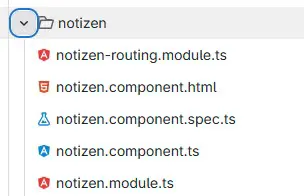
Before deleting the yourcomp.module.ts you need to migrate every functional part to the standalone component:
//tobe removed
export class FallHeaderModule {
    private readonly mobiIconRegistry = inject(MobiIconRegistry);

    constructor() {
        const mobiIconRegistry = this.mobiIconRegistry;

        mobiIconRegistry.registerIcons([
            // AktionIcons.FallLoeschen
            mobiIconTrash,
            mobiIconTikOutlined,
            mobiIconMailLetter,
        ]);
    }
}
to the yourcomp.ts
ngOnInit(): void {
        this.mobiIconRegistry.registerIcons([
            mobiIconTrash,
            mobiIconTikOutlined,
            mobiIconMailLetter,
            mobiIconDocument,
        ]);
remove the module from imports , decorate the standalone component with directive standalone: true and add needed imports to the component definitions.
yourcomp-routing.module.ts needs to be migrated to the
import { NgModule } from '@angular/core';
import { RouterModule, Routes } from '@angular/router';
import { NotizenComponent } from './notizen.component';
const routes: Routes = [{ path: '', component: NotizenComponent }];

@NgModule({
    imports: [RouterModule.forChild(routes)],
    exports: [RouterModule],
})
should be migrated to yourcomp.routes.ts
export class NotizenRoutingModule {}
import { Routes } from '@angular/router';
import { NotizenComponent } from './notizen.component';
export const NOTIZEN_ROUTES: Routes = [{ path: '', component: NotizenComponent }];
which should be update in your application routes.ts
{
                path: 'notizen',
                canActivate: [
                    (route: ActivatedRouteSnapshot) =>
                        inject(PageTitleLoaderGuard).canActivate(route),
                ],
                loadChildren: () =>
                    import('../../../features/notizen/notizen.routes').then(m => m.NOTIZEN_ROUTES),
            },
or directly as component without creating routes.ts file
loadComponent: () =>
                    import('../../../features/notizen/notizen.component').then(
                        m => m.NotizenComponent,
                    ),
You may also need to create app.config.ts and delete app.module.ts and create core.ts if not already existing and delete core.modules.ts. Also app.config.ts needs to reference routes from app.module.ts.
For the tests the most important was mention as an advantage. the declarations part should be removed and .overridecomponent for the TestBed added:
Before standalone :
   beforeEach(waitForAsync(() => {
        TestBed.configureTestingModule({
            schemas: [NO_ERRORS_SCHEMA, CUSTOM_ELEMENTS_SCHEMA],
            declarations: [
                FallHeaderComponent,
                MockFallHeaderIconBarComponent,
                MockComponent(AroContentHeaderFallKachelComponent),
                MockComponent(PartnerKachelComponent),
                MockComponent(EdossierContentheaderIconComponent),
                MockComponent(AroAktionenComponent),
            ],
            imports: [LayoutModule, B2eIconTestingModule],
            providers: [
                provideHttpClient(),
                provideHttpClientTesting(),
                provideMockStore({
                    initialState,
                }),
                {
                    provide: TranslationService,
                    useValue: {
                        translate: jest.fn().mockImplementation(key => of(key)),
                        getLanguage: jest.fn().mockReturnValue(of('de')),
                    },
                },
                {
                    provide: BeratungsfallService,
                    useValue: {
                        isAllowedToDeleteFall$: jest.fn().mockReturnValue(of(true)),
                        hasPendenteAufgaben: jest.fn().mockReturnValue(of(false)),
                    },
                },
                {
                    provide: AroVerlaufFavoritenService,
                    useValue: {
                        favorit$: of({}),
                    },
                },
            ],
        }).compileComponents();
    }));

    beforeEach(() => {
        fixture = TestBed.createComponent(FallHeaderComponent);
        component = fixture.componentInstance;
        beratungsfallServiceMock = TestBed.inject(BeratungsfallService);
        mockStore = TestBed.inject(MockStore);

        fixture.detectChanges();
    });
After Standalone migration and correction
 beforeEach(waitForAsync(() => {
        TestBed.configureTestingModule({
            schemas: [NO_ERRORS_SCHEMA, CUSTOM_ELEMENTS_SCHEMA],
            imports: [FallHeaderComponent],
            providers: [
                provideHttpClient(),
                provideHttpClientTesting(),
                provideMockStore({
                    initialState,
                }),
                {
                    provide: TranslationService,
                    useValue: {
                        translate: jest.fn().mockImplementation(key => of(key)),
                        getLanguage: jest.fn().mockReturnValue(of('de')),
                        addTranslation: jest.fn(),
                    },
                },
                {
                    provide: BeratungsfallService,
                    useValue: {
                        isAllowedToDeleteFall$: jest.fn().mockReturnValue(of(true)),
                        hasPendenteAufgaben: jest.fn().mockReturnValue(of(false)),
                    },
                },
                {
                    provide: AroVerlaufFavoritenService,
                    useValue: {
                        favorit$: of({}),
                    },
                },
                MobiIconRegistry,
                {
                    provide: ActivatedRoute,
                    useValue: {},
                },
            ],
        })
            .overrideComponent(FallHeaderComponent, {
                set: {
                    imports: [AsyncPipe],
                    schemas: [NO_ERRORS_SCHEMA],
                },
            })
            .compileComponents();
    }));
    beforeEach(() => {
        fixture = TestBed.createComponent(FallHeaderComponent);
        component = fixture.componentInstance;
        beratungsfallServiceMock = TestBed.inject(BeratungsfallService);
        mockStore = TestBed.inject(MockStore);

        fixture.detectChanges();
    });
After you can compile your angular application test it intensivaly.
For any questions, consulting, help, migration , contact us !





