
Steps needed to make Siebel CRM 21.5 installation running
Oracle has accelerated innovations in Siebel CRM and has brought quite a few innovations in 2021. We have discussed the main innovations in our blog . For the installation it is important that the installer is simple and doesn‘t need to create an image. After downloading the install zip packages you need to only unzip them and start straight forward installation.
Complete installation guide can be found here : https://docs.oracle.com/cd/F26413_17/books/SiebInst/index.html.
For the IP17+ version there are following documented update installation scenarios:
- New Deployment
- Update Installation Case
- There can be 3rd scenario in case new servers or OS version is needed to install new server binaries and perform IRM against existing Siebel CRM DB
The installation consist of 2 main tasks, installation and configuration of the Gateway security profile, Siebel enterprise profile, Siebel server profile, AI Profile.
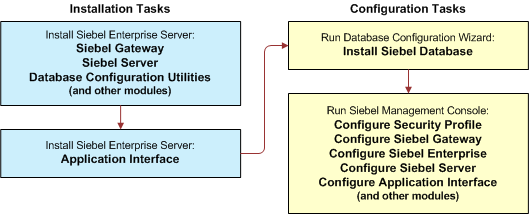
After configuring siebel server there is step to start the server with command
# ./start_server ALL
We have found in the log following error :
Server Is Not Coming Up: gethostbyname_r ()failed with error
Reading articles Siebel Server Is Not Coming Up: gethostbyname_r ()failed with error (Doc ID 2304168.1) and Siebel 8.1.1.9 startup error in Linux (Doc ID 1517242.1) following steps lead to make the siebel server start :
- srvrmgr> change param Host=<VALUE> for server <servername>
- Add following lines to siebenv.sh startup script :
RESOLV_MULTI=off; export RESOLV_MULTI
For Scenario 3, if you need to install new server and use existing Siebel Repository and DB, there is a gap. In the update scenario the DB incremental repository merge is done. For the new installation with existing DB these steps the PostInstallDB Setup utility needs to be triggered manually.
Here is the needed cofiguration :
Create Setup.ini in../siebel/ses/siebsrvr/bin with following content :
SIEBSRVR_ROOT=/../siebel/ses/siebsrvr
REPOSITORY=Siebel Repository
DBTYPE=oracle
ODBC_DSN=host_DSN
SIEBEL_DSN=ServerDataSrc
TBLO=SIEBEL
TBLOUSER=SIEBEL
SIEBUSER=SADMIN
SSE_ROLE=SSE_ROLE
UNICODEDB=N
PRIMARY_LANG_CD=ENU
OTHER_LANG_CD=FRA,ITA,DEU
INDSPC=SIEBEL_INDEX
TBLSPC=SIEBEL_DATA
TBLSPC16K=
TBLSPC32K=
From bin directory execute command :
./PostInstallDBSetup -i Setup.ini -p pswdl -z user
Please note that after Siebel CRM 20.10 migration App no more needs DB and EAIObjMgr and WfProcMgr components needs to be running in order to login into Migration app.





