
Intelligent comparison of SiebelMessage XMLs with xmlunit
Our customer has the need to replace existing middleware with a new one based on Kafka. Requirement was to produce same events with the new messaging platform as with current one, to keep existing functionality processing the messages in Oracle Siebel CRM untouched and unchanged. To support Kafka development team, we were given the task to develop XML comparison tool that will run in the Production environment and compare received in parallel Siebel XML messages from current integration middleware and from Kafka (newly developed system).
The comparison consists of two steps, the fist step is using xlst transformation to remove namespaces and to substitute some values if needed. The second step is comparison itself performed using xmlunit. The objective for comparison is Siebel message is in the picture:
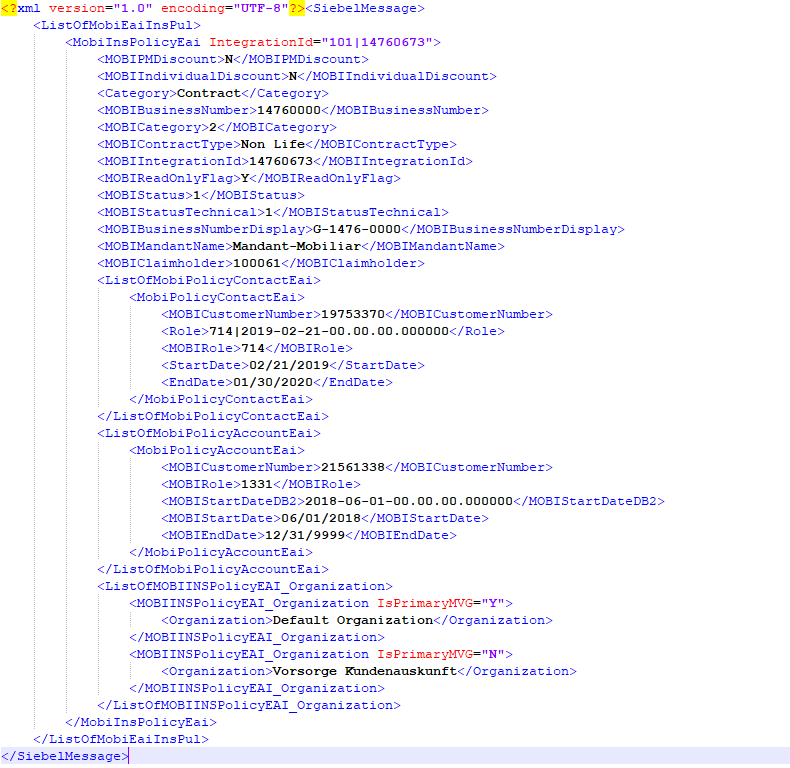
It has primary component attributes and then child components that associate policy with account or contact, as well as organization. The order of attributes and even order of child components is not guaranteed and therefore comparison tool must be robust and intelligent enough. xmlunit library has been chosen for this pupose.
The whole functionality of comparison can be devided into three stages.Firstly, we have to define Element Selector It is defined as follows:
ElementSelector childSelector = ElementSelectors.conditionalBuilder()
	.whenElementIsNamed("MOBIINSPolicyEAI_Organization")
	.thenUse(byXPath("./Organization", ElementSelectors.byNameAndText))
	.whenElementIsNamed("MobiPolicyContactEai")
	.thenUse(ElementSelectors.and(
		ElementSelectors.byXPath("./Role", ElementSelectors.byNameAndText),
		ElementSelectors.byXPath("./MOBICustomerNumber", ElementSelectors.byNameAndText)))
	.whenElementIsNamed("MobiPolicyAccountEai")
	.thenUse(ElementSelectors.and(
		ElementSelectors.byXPath("./MOBIRole", ElementSelectors.byNameAndText),
		ElementSelectors.byXPath("./MOBICustomerNumber", ElementSelectors.byNameAndText)))
	.elseUse(ElementSelectors.byName)
	.build();
As there are three child business components, MOBIINSPolicyEAI_Organization, MobiPolicyContactEai, MobiPolicyAccountEai, we have to correctly select attributes for each child, to uniquely define given child, so called user key. In that case xmlunit will guarantee, it can compare child elements independently from the order. ElementSelector is indeed the “heart” of comparison. The most suitable was use the selector byNameAndText with combination with byXPath.
The comparison itself is done with class DiffBuilder
String[] ignoreNodes = {
       "MOBIABDisbursement", "ExpirationDate", "MOBIIndustry", "MOBISuspensionDate", "MOBICancelationDate"
};

Diff diffs = DiffBuilder.compare(xml1)
	.withTest(xml2)
	.checkForSimilar()
        .withNodeMatcher(new DefaultNodeMatcher(childSelector))
	.ignoreWhitespace()
        .ignoreComments()
	.ignoreElementContentWhitespace()
        .withNodeFilter(node -> isTestNode(node, ignoreNodes))
	.build();
Our DiffBuilder compares xmls stored in xml1, xml2, checks only for similar because, we ignore the order, uses our ElementSelector defined in step 1 and finally ignore some nodes defined in String array ignoreNodes.
Lastly, we have to display results/differences returned by compare function of the DiffBuilder in readable form. We use DefaultComparisonFormatter. For each difference we need Xpath of the node where is the difference and formatted difference detail. To achieve we used following code.
DefaultComparisonFormatter formatter = new DefaultComparisonFormatter();
Comparison comparison = diff.getComparison();

if (comparison.getControlDetails() != null && comparison.getControlDetails().getXPath() != null)
	xPath1 = comparison.getControlDetails().getXPath();
if (comparison.getTestDetails() != null && comparison.getTestDetails().getXPath() != null)
	xPath2 = comparison.getTestDetails().getXPath();

formattedDiffDetail1 = formatter.getDetails(comparison.getControlDetails(), comparison.getType(), true);
formattedDiffDetail2 = formatter.getDetails(comparison.getTestDetails(), comparison.getType(), true);
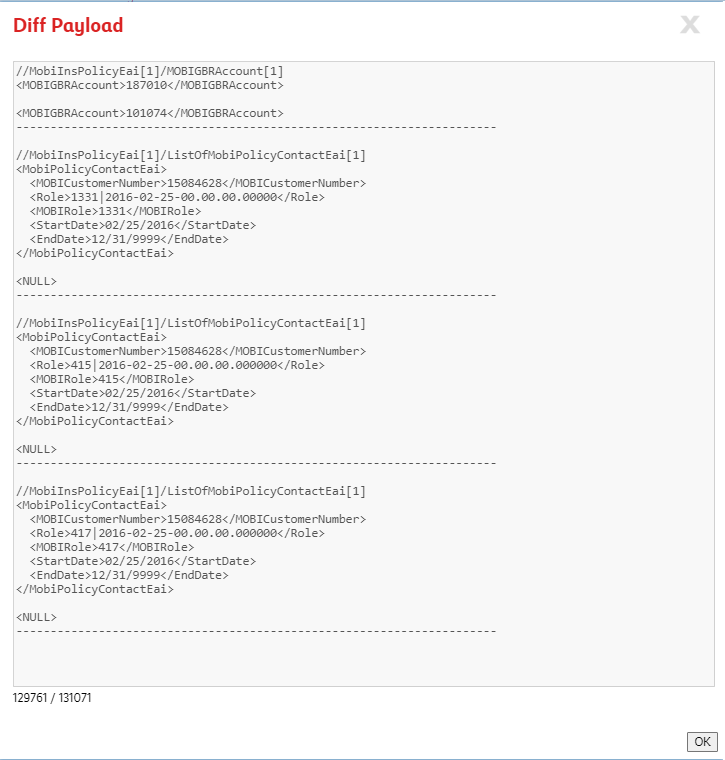
The example of comparison output is in following figure:
The whole java functionality is deployed as Quarkus application and uses Panache libraries for Hibernate-based persistence layer and database connection. It connects using jdbc into Siebel database to query the records, process them and write updates back to Siebel custom tables. Cron job is configured to run comparison jar in 2 hours interval. To visualize results, we have built custom Siebel UI View and applets.
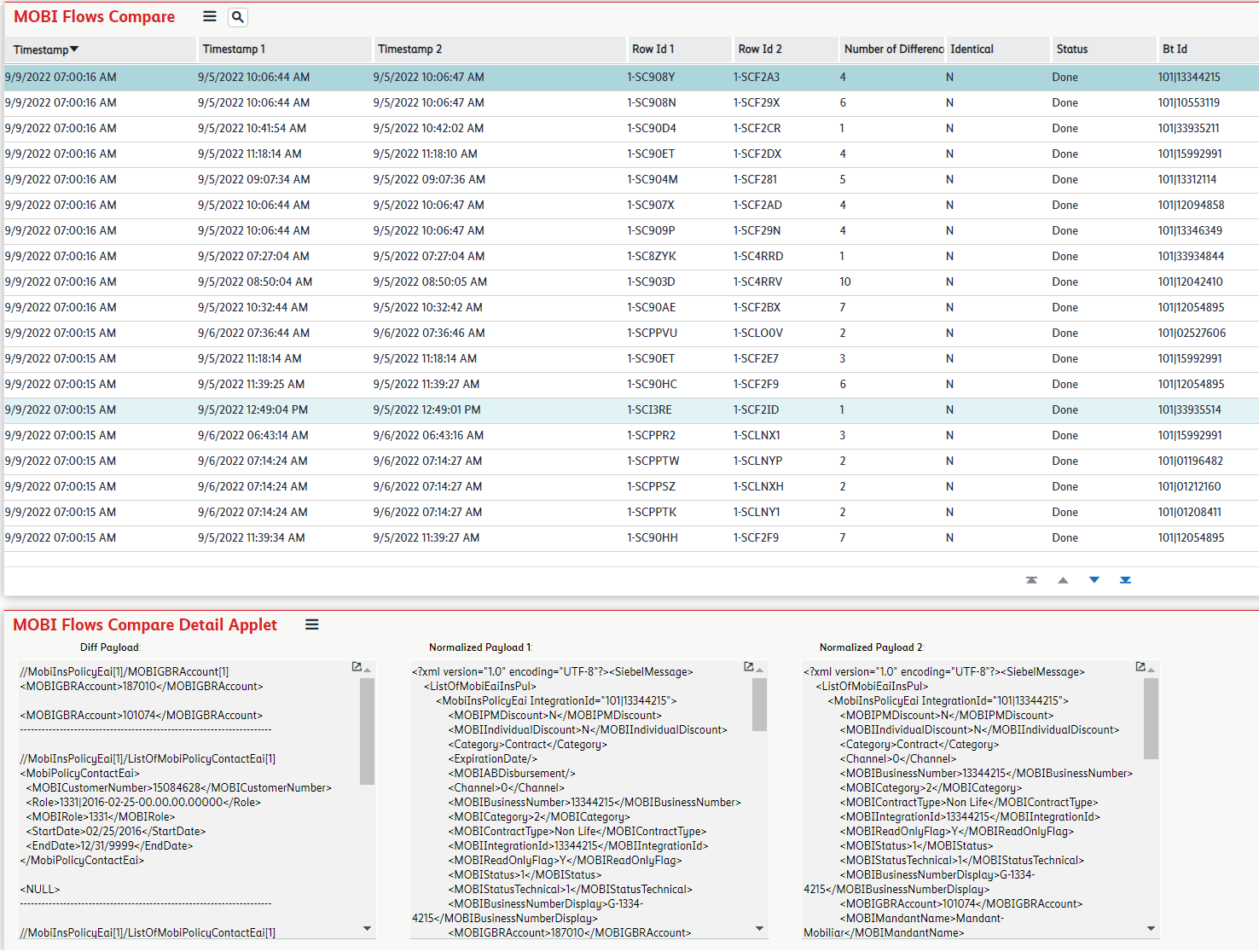
In this blog we present complete framework tightly coupled with Siebel for comparison xml generated by the current integration platform and by the new Kafka solution to see if the new system is generating the same messages and if the new system is capable of replacing existing one. Comparison results have helped us to improve customization in Kafka to generate exact same messages.





