
How to configure logging for Tomcats and Siebel Gateway in IP18 and later
Oracle Siebel CRM since IP17 has changed the architecture. Since IP17 Siebel CRM uses Tomcat as the application container in the architecture, as can be seen here: https://www.siebelhub.com/main/2019/06/siebel-2019-get-a-grip.html
Thus, Tomcat has become an important part of the architecture and it is worth to know how to troubleshoot it, analyze logs, tune etc.
In this blog we will focus on how to set up logging of all Tomcats in the Siebel IP18+ architecture. From the diagram in here one can see, Siebel since IP17 contains three different types of Tomcats. Between IP17 and IP18 are changes concerning the Gateway, this has become clustered with IP18 and therefore IP18 is the minimum version to cope with.
Cloud Gateway tomcat service
First Tomcat is used for Gateway, as a Cloud Gateway tomcat service, providing interface to access Siebel configuration stored in Gateway. In Gateway Application Container log directory following log files can be observed.
■ cloudgateway.log
■ zookeeper_client.log
■ siebel-outbound.log for outbound SHA-2
■ siebeljbs.log for 64-bit Java business service executions
Logs siebel-outbound.log and siebeljbs.log are from siebel.war and on the Gateway server they only contain default errors (because configuration file configagent.properties usually does not exists in webapps folder). The configuration of these logs is located in file configagent.properties in directory SIEBEL_ROOT/applicationcontainer/webapps.
To configure logging content of cloudgateway.log edit file gateway.properties located in SIEBEL_ROOT/applicationcontainer/webapps. Set log4j.appender.file.Level to one of the following values
■ ALL. The ALL level has the lowest possible rank and is intended to turn on all logging.
■ TRACE. The TRACE level designates finer-grained informational events than DEBUG.
■ DEBUG. The DEBUG level designates fine-grained informational events that are most useful to debug an application.
■ INFO. The INFO level designates informational messages that highlight the progress of the application at coarse-grained level.
■ WARN. The WARN level designates potentially harmful situations.
■ ERROR. The ERROR level designates error events that might still allow the application to continue running.
■ FATAL. The FATAL level designates very severe error events that will presumably lead the application to abort.
Additionally, you can use the following log level to turn off logging:
■ OFF. The OFF level has the highest possible rank and is intended to turn off logging.
cloudgateway.log is the main log of the container running in GW Tomcat, so use this log to troubleshoot the GW Tomcat functionality.
Zookeeper Client that runs in Tomcat writes logs into zookeeper_client.log. To configure zookeeper_client.log it is needed to edit the file log4j.properties in SIEBEL_ROOT/applicationcontainer/webapps/siebel/WEB-INF/classes and set following:
zookeeper.root.logger=DEBUG, ROLLINGFILE
zookeeper.log.dir=.
log4j.appender.ROLLINGFILE=org.apache.log4j.RollingFileAppender
log4j.appender.ROLLINGFILE.Threshold=DEBUG
log4j.appender.ROLLINGFILE.File=zookeeper_client.log
If you want to troubleshoot the zookeeper process and see logs of it, to enable logging please follow:
Putty to GW server, go to SIEBEL_ROOT directory and stop gateway server
cd gtwysrvr
. ./siebenv.sh
stop_ns
Edit start_ns script, add following command:
export _JAVA_OPTIONS="-Dlog4j.configuration=file:$ses/gtwysrvr/zookeeper/conf/log4j.properties -Dzookeeper.root.logger=DEBUG,ROLLINGFILE -Dzookeeper.log.dir=$ses/gtwysrvr/log -Dzookeeper.log.file=zookeeper_roll_server.log"
start_ns
For details please see Doc ID 2555834.1, the logging configuration for zookeeper has changed since IP 18.9.
AI Tomcat
Second “type” of Tomcat is used as an Application Interface (former SWSE, Webserver with Siebel extensions) and is used for AI for Siebel application, SMC and Migration application.
Siebel Application Interface writes several different types of logs. These logs include the following:
■ UI.log for user applications
■ EAI.log for EAI applications
■ siebeljbs.log for 64-bit Java business service executions
■ siebel-outbound.log for outbound SHA-2
■ CommonLogger.log
for some common events like startup and shutdown of Siebel Application Interface The logs noted above are written in the SIEBEL_ROOT/ai/applicationcontainer/logs directory. Standard application container logs are created in the same directory
To configure siebel-outbound.log and siebeljbs.log, edit configagent.properties in directory SIEBEL_ROOT/applicationcontainer/webapps, these logs are written by siebel java business functionality and outbound communication, not used in AI Tomcat, we will describe configuration of these files in next section.
To configure the log level for the common logger, you edit the file log4j2-siebel.xml, which is located in the directory SIEBEL_ ROOT/ai/applicationcontainer/webapps/siebel/WEB-INF. Modify only the following line, and no other part of the file. For example, you can change the level from ERROR to INFO. You can use the following values: TRACE, DEBUG, INFO, WARN, ERROR, or FATAL. The default log level configured in the file is ERROR.
<logger name="CommonLogger" level="ERROR" additivity="false">
Note: Settings such as INFO, DEBUG, or TRACE can exponentially increase the size of the log files, consume a large amount of disk space, and reduce performance of the Siebel Application Interface node. Use these settings only when some investigation is needed.
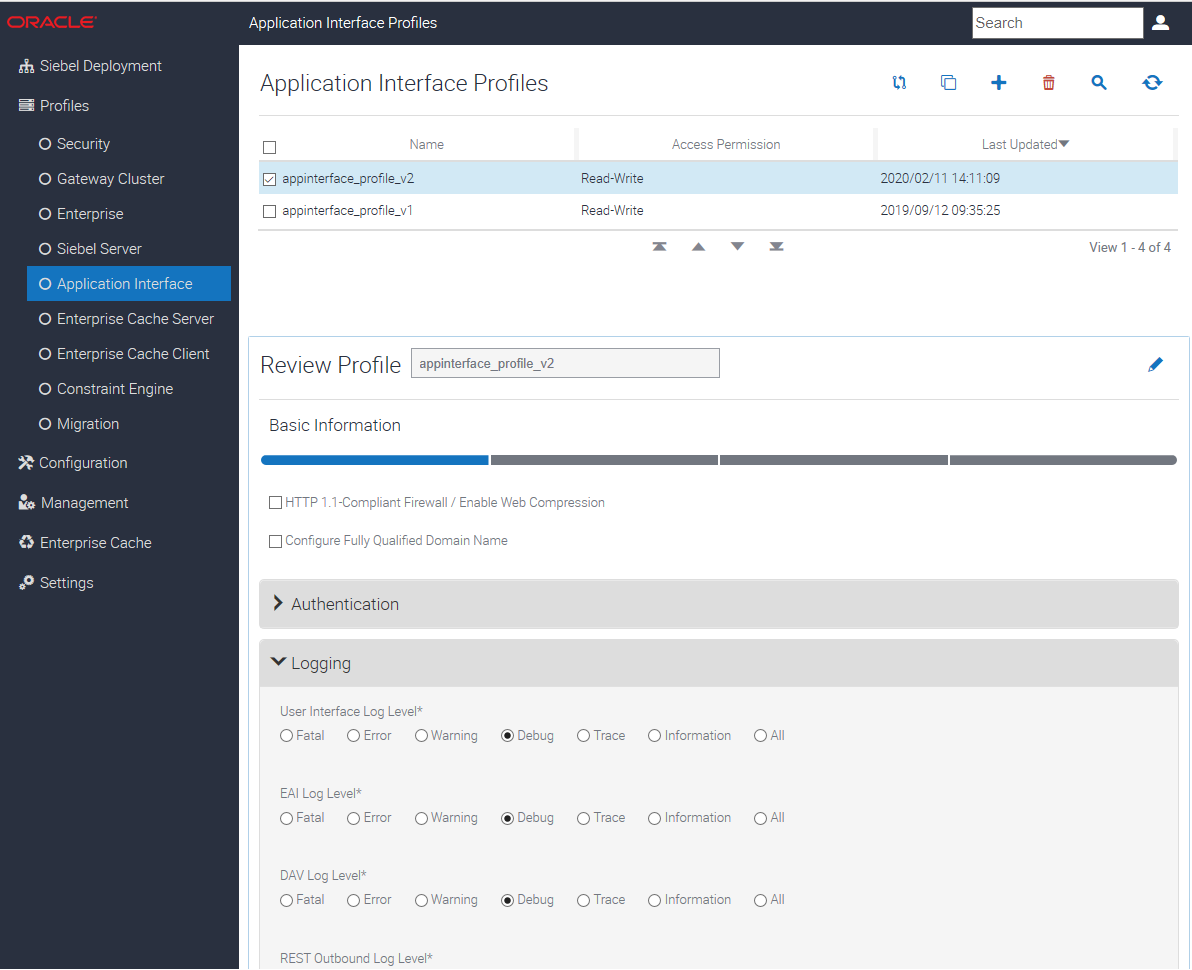
For Siebel Application Interface, log levels are configured in the Application Interface profile. For more information, see following screenshot. Please note, after successful start of AI container, logging configuration is taken from AI profile configuration, therefore important is, what is configured there.
Siebel Enterprise Server Tomcat Application Container Instance
Third instance type of tomcat serves mainly for Java Business Service functionality and outbound (outbound SHA-2, JMS) integration related functionalities linked with Siebel application servers.
The objective logs of Siebel Server Tomcat Instance are as follows:
SES Tomcat Application Container writes several different types of logs. These logs include the following:
■ jms.log
■ siebeljbs.log
■ localhost.log (Tomcat log)
■ localhost_access_log (Tomcat access log along with IP address, date time, …)
■ catalina.out (main Tomcat log, System.out and System.err)
Last 3 log files are standard Tomcat logs, for more details please refer to: http://tomcat.apache.org/tomcat-9.0-doc/logging.html.
jms.log contains information about sending jms messages. siebeljbs.log contains information related to Java Business Service functionality invoked from Siebel. These two logs are configured are in file configagent.properties in location SIEBEL_ROOT/sieb/applicationcontainer/webapps. For more details, please refer to: http://www.ccw.sk/sk/blog/how-to-enable-tracing-rest-outbound-calls-in-siebel-ip17-and-higher.html
Set JBSLogLevel=5 and JMSLogLevel=5 or other level for siebeljbs.log or jms.log respectively. Please refer to Doc ID 2612031.1 before you set jms logs in Production system.





