Cloud Azure integration for Emails with Siebel CRM IP22.8 using OAuth2
Microsoft has announced that is retiring Basic Authentication for Exchange Online services as part of Microsoft Modern Authentication strategy. As per January 2023 basic authentification will be disabled for all protocols in the cloud. For the tenants which are not ready there is a one time reactivation possibility until end of 2022.
More information can you find here.
For the Oracle Siebel CRM the OAuth2 for Emails was not supported until the Innovation Pack 22.8 Customers which are using Microsoft Azure Cloud for the Exchange Online Emails. To enable the OAuth for the Azure Cloud Exchange there needs to be done configuration both on Azure side and on Siebel CRM IP22.8 side.
In this article we will not describe what is to be done in detail, we just share the official documentation.
For the Azure part :
NOTE: The information provided below is based on Microsoft documentation. Please contact Microsoft Support for issues related to application configuration using Azure Portal. For more information, please reference these Microsoft Links below that explained more details related to "Authenticate an IMAP, POP or SMTP connection using OAuth":
For the Siebel part :
The OAuth2 is only supported starting with IP22.8.
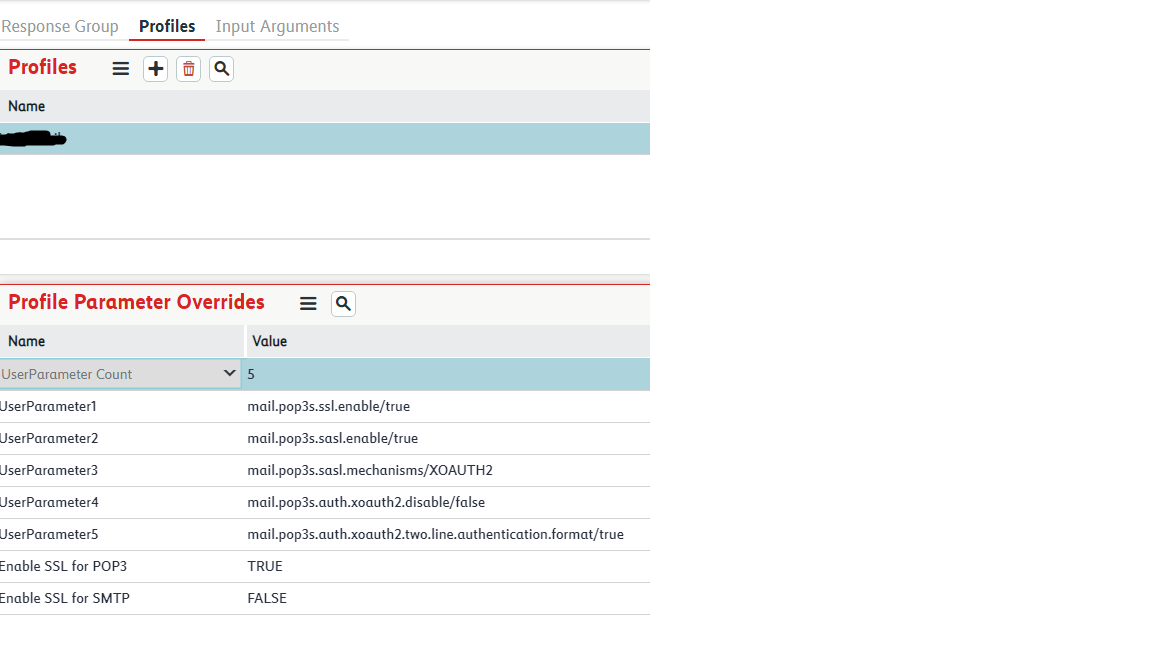
To successfully finish the Siebel CRM configuration we need to additionally mention this part, which is yet not described :
If you have parameter
Enable SSL for POP3 set to TRUE,
note that if you're using the "pop3s" protocol to access POP3 over SSL, all the properties would be named "mail.pop3s.*".